

Platform teams: start here
For platform teams. This page shows what the platform is made of, what you decide, and which questions the Platform dashboard answers on your first day.
A platform team offers resources to feature teams and keeps the platform running. In Joomiz, you do this through the control plane, the provisioners and the catalog of types. People with the role operator do the platform tasks.
What the platform is made of
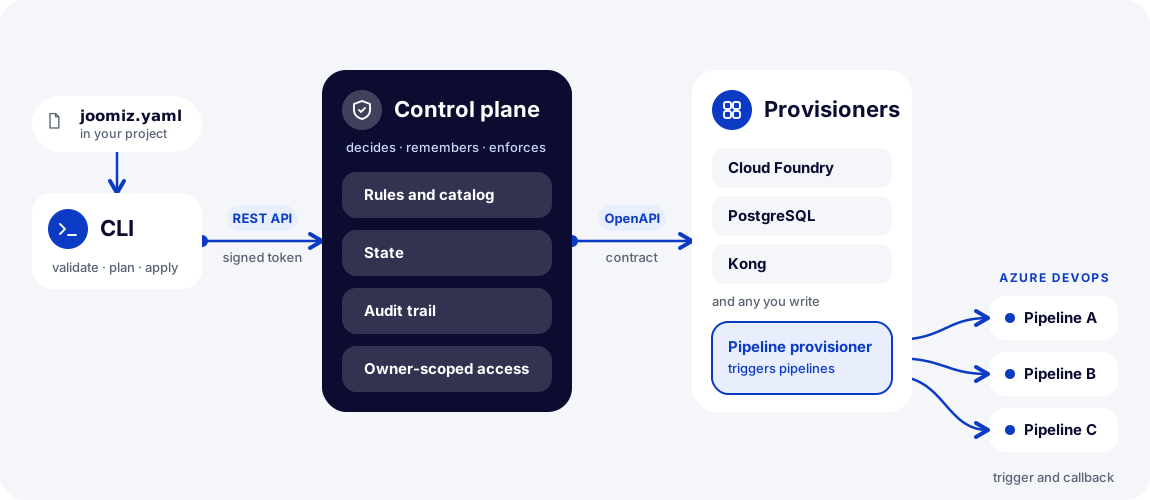
The table below describes each part in words.
| Part | What it does |
|---|---|
| Control plane | Receives requests from the CLI and from the dashboard. It applies the rules, keeps the state and records the audit trail. |
| Database | A PostgreSQL database. The control plane keeps its state there. |
| Identity provider | Signs people in with OAuth 2.0. Its tokens carry the roles operator and owner:<team>. |
| Provisioners | Services that do the work for the types that they handle. The control plane calls them over HTTP. |
| Dashboard service | The web service of the Platform dashboard. It signs people in and shows the pages of the dashboard. |
What you decide
- The types. The catalog holds the types that feature teams can use. You add a type by releasing a new version of the control plane. Own the catalog of types explains it.
- The provisioners. Each type needs a provisioner. You register a provisioner in the dashboard, or with the API call
POST /provisioners. Register a provisioner shows how. - The networks. The setting
joomiz.provisioners.allowed-networksadds network ranges where the control plane may call a provisioner. The default is an empty list. Allow the address of your provisioner explains it. - The retention. The setting
joomiz.audit.retentionsets how long the control plane keeps an audit event. It accepts 90 to 3650 days. The default is 400 days. - The roles. You give the roles
operatorandowner:<team>to people in your identity provider.
What the roles allow
| Role | What it lets you do |
|---|---|
owner:<team> | Register applications for the team. Plan and apply changes for the applications of the team. Read the runs and the audit events of those applications. |
operator | List, read, register, update and remove provisioners. Release a stuck apply lock with joomiz runs abandon. Create audit erasures. Read all runs, all applications and all audit events. Plan and apply for any application. |
The role operator and the role owner:<team> are separate. One person can hold both. An operator cannot register an application, because registration needs exactly one owner:<team> role. Without the right role, the control plane answers with 403.
Your first day with the dashboard
Sign in to the Platform dashboard with the role operator. The platform team that deploys the dashboard sets its address in the setting public-url. Deploy the dashboard shows how. Each page answers one question:
| You ask | Open |
|---|---|
| Is the control plane up? | Overview |
| Which provisioners are registered? | Provisioners |
| What ran, and did it fail? | Runs |
| Which applications are registered? | Applications |
| Who did what? | Audit |
A person with the role owner:<team> can sign in too. The Overview page and the Provisioners pages answer with "Operator role needed" for that person. The Runs, Applications and Audit pages show what the control plane lets an owner see.
Where to read next
| I want to | Read |
|---|---|
| Understand what a provisioner does | What a provisioner is |
| Tell the control plane about a provisioner | Register a provisioner |
| Write a provisioner | Build a provisioner with the starter |
| Let a provisioner finish slow work | Support slow work in a provisioner |
| Fix a refused provisioner address | Allow the address of your provisioner |
| Set up the provisioners for Azure DevOps and Cloud Foundry | The provisioners for Azure DevOps and Cloud Foundry |
| Know which types exist and how a new type arrives | Own the catalog of types |
| Learn what each page of the Platform dashboard is for | Use the Platform dashboard |
| Free the lock of an apply that does not end | Release a stuck apply lock |
| Find out why a run failed | Investigate a failed run |
| Read who did what, or remove a person from the trail | Read and manage the audit trail |
| Check that the control plane is up, or send traces and metrics | Check health and follow a run |
| Look up a call, a field or a limit of a provisioner | Provisioner API reference |
| Look up a command or an option of the CLI | CLI reference |
| Look up a call of the control plane API | Control plane API reference |
| Look up a setting of the control plane | Settings reference |
| Look up a status, a refusal or an exit code | Run results, refusal reasons and exit codes |
| Run the control plane with a database and an identity provider | Deploy the control plane |
| Run the service of the dashboard and give it an address | Deploy the dashboard |
| Prepare your identity provider for the CLI and the dashboard | Connect an identity provider |
Look up the schema of joomiz.yaml | The joomiz.yaml schema |
| See what your feature teams do | Feature teams: start here |
| Follow a first service from file to apply | Deploy your first service |
| Learn the name of each thing in Joomiz | How Joomiz works |